Chord charts, TAB and rhythm in one appEvery chart you need,
all in Tableaf.

Write chord charts with TAB and rhythm, share them with one link, and play straight from them on stage.

Tableaf is a browser app that covers writing, sharing and turning pages on stage. It works on Mac, Windows, iPad, iPhone and Android.

Note: the app works in English and Japanese. You can switch between them at any time from the menu on the home screen.

Find your part

Sound familiar?

Export, import,
send it again.

The PDF round trip

Export a PDF from one app, import it into a page-turning app. Every small fix means starting over.

Your notes drift

You replace the chart, and the notes you wrote at rehearsal no longer line up. Time to write them again.

Which version is the latest?

Photos of handwritten charts in the group chat. Some players want notation, some want TAB, and someone rewrites it twice.

With Tableaf, you need none of these.

Demo

Try it right here,
no sign-up.

Type a chord into an empty bar and it moves to the next one. Press “▶ Perform” to try Performance mode. Nothing you do here is saved.

On phones, the demo opens full screen.

Open the demo

Write

Type and it moves on.
As fast as you type.

No menus, no pop-up windows. Just tap, type and drag on the chart itself.

Real time. 8 bars in about 7 seconds.

Type, and it moves on

On a computer, type “Am7” and it goes to the next bar. On iPad and iPhone, tap the chords of the song’s key.

Drag to write hits

Tap a cell for a note, drag for a longer one. Ties across bar lines just work.

Edit like a text editor

Select a range to copy, paste or delete. Undo with ⌘Z on a Mac or the ↶ button on iPad.

Live & notes

From your chart
straight to the stage.

No separate app for writing and another for page turning. The chart you fixed at rehearsal is already on your live screen.

Notes stick to the bar

Edit the chart and your handwritten notes stay where they belong.

Turn pages your way

Tap, swipe or use a Bluetooth pedal. Press the pedal twice by accident and it won’t skip too far.

Half-page turns

Turn the bottom half first to read ahead to the next line.

Play through a setlist

Keep turning pages across songs in setlist order.

TAB

Chord charts in the language
of bass and guitar.

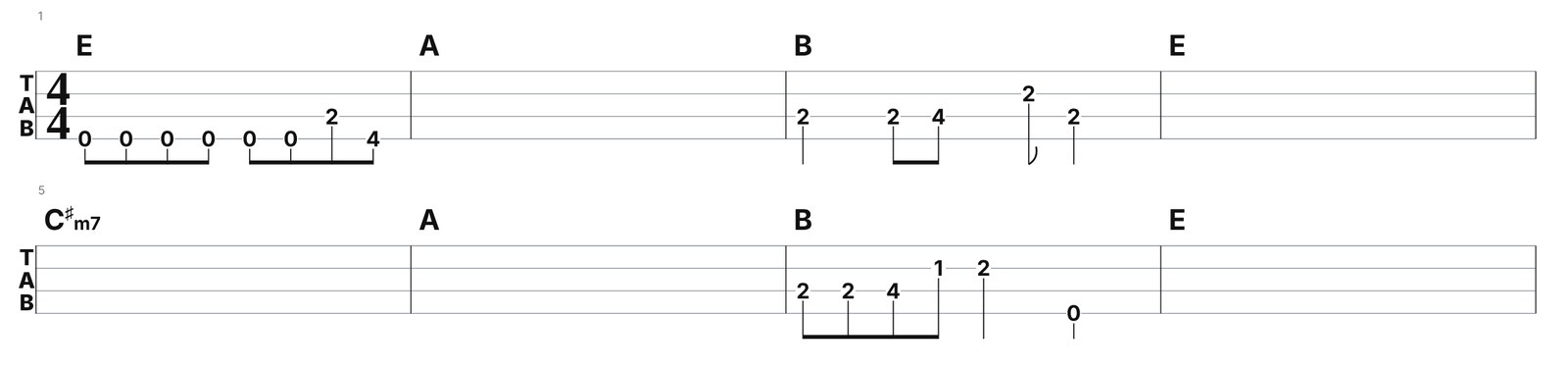
TAB alone can’t show rhythm. Notation alone can’t show where to play. In Tableaf, chords, the rhythm of hits and fret numbers share one chart.

A chord chart with 4-string TAB under the chords, showing the rhythm and fret numbers of a hit
  • 4 to 7 TAB lines (4- and 5-string bass, 6- and 7-string guitar)
  • On a computer, type “A5” (string + fret). On iPad, tap a line and press a number
  • Just want the hits? Rhythm only is fine
  • Whoever receives the chart can switch to standard notation: TAB numbers are shown as notes at the right pitch

NEWDo you know the name of that chord?

Enter the shape you play in tab, and Tableaf suggests the chord name. No theory needed to hand your band a chord chart.

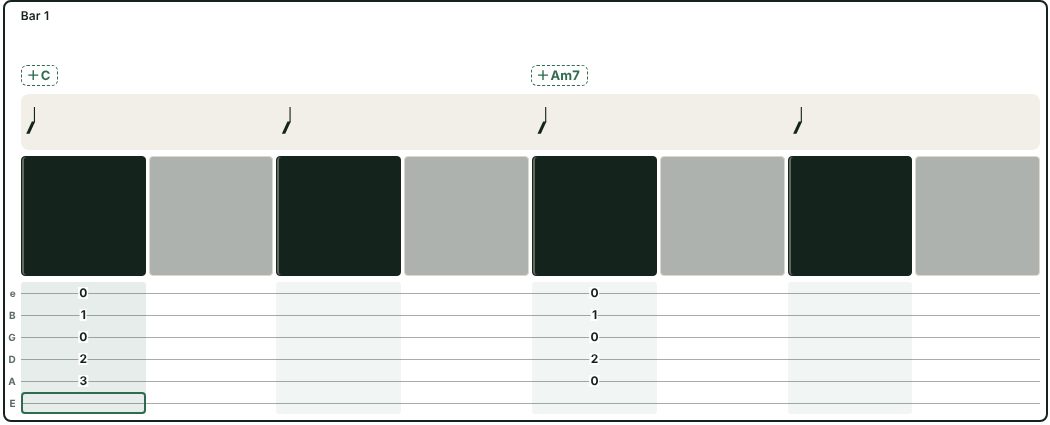
Dotted chord suggestions “+C” and “+Am7” above notes entered on several strings in tab
  • Enter notes on two or more strings at once in the Tab tab of the rhythm editor, and a dotted chip such as “+Am7” appears above that beat. Tap it to add the chord
  • Not the one you meant? Tap the other suggestion in the notice, or undo with ↶
  • Tab-only song? Select bars and use “Fill in chords from tab” in the bar menu. Beats that already have a chord are left as they are
  • Slash chords (C/E), power chords (E5) and extensions (E7(9), B7(♭13)). Tuning and capo are taken into account. Included in the free plan

6/9 and dim7 may get a close alternative name. Shapes without the root may get a different name, and arpeggios (one note at a time) are not suggested.

Share

One link,
the whole setlist.

Turn a setlist into a link and send it in your group chat. The people you send it to need no account and pay nothing. When you fix a chart, it reaches everyone’s screen automatically.

Free for viewers

No account, no app to install.

Fixes reach everyone

No re-sending, no “which version is the latest?”

Personal notes

Each player can write their own notes without changing the original.

Devices

Write on a computer,
play from a tablet. Even offline.

Write at home on Mac or Windows, turn pages on stage with an iPad. Pick up the same chart wherever you left off.

iPad

Tap buttons for chords, tap a line and a number for TAB. A good size for turning pages on stage.

Mac & Windows

Type “Am7 ⏎” on the keyboard. In Chrome or Edge, “Install app” gives it its own window.

iPhone & Android

For quick fixes on the move and checking charts you receive. For live page turning, a tablet or larger is recommended.

Even in a basement venue

Save to your device and open every song without a signal. A setlist shows when it is ready to use offline.

For composers & arrangers / MIDI

When the arrangement is done,
the chart is nearly done too.

Import MIDI from your DAW and Tableaf reads the harmony and bass notes, including slash chords and the key, to draft the chord chart. Chords it is unsure about are marked with a dotted line, so you just pick from the suggestions.

Open MIDI → draft → pick the dotted chords from suggestions.
  • Choose a role for each track and check an 8-bar preview before importing
  • MusicXML: chords import, and notes can be placed onto TAB (bass/guitar) or a melody line automatically

Pricing

Start free.
If you keep going, just pick how to pay.

There is one paid plan. Write, annotate, play live and share, with no limit on songs.

First 100 people

Founder

¥3,980one time

The same as the one-time purchase (¥6,800), for ¥3,980.
Pay once, use it for good.

  • Same features as the one-time purchase
  • Only for the first 100 people; closes when 100 is reached
Become a founder

Free

¥0

  • All features for up to 5 songs (MIDI import too)
  • No time limit
  • Receiving share links is always free
Start free

Yearly

¥3,600/year

¥300 a month, renews every year

  • ¥2,160 less than a year of monthly
  • Cancel anytime; use it until the end of the period
Start yearly

Monthly

¥480/month

Renews every month

  • Only pay for the months you use it
  • Cancel anytime; use it until the end of the period
Start monthly

One-time

¥6,800one time

  • Pay once, use it for good
  • No monthly or yearly payments
Buy once

Prices are in Japanese yen and include Japanese consumption tax. International credit cards are accepted (via Stripe); your card issuer converts the amount to your currency. Every plan includes the same features. Yearly and monthly plans renew automatically and can be cancelled anytime from “アカウント” (Account) in the app (no prorated refunds).

Story

Born on stage.

“I wish I could write chord charts in TAB.”

That is what I thought in autumn 2026, playing bass as a session musician. Even after writing a chord chart, I needed another app to turn pages on stage, and every fix meant exporting and importing again. Out of that frustration I made the first version, and together with Yutaro Fujishiro, a composer, arranger and session musician, we solved the problems one by one, from the side of the people who write charts and the people who play them.

Tableaf is what the two of us wanted on stage, made real.

Team Operated by Eureka Entertainment Inc. (Tokyo, Japan)

DeveloperMasato ShiraiBassist, Halo at 四畳半 / Producer, may in film

Co-developerYutaro FujishiroComposer, arranger / Session musician

FAQ

Frequently asked questions

What is Tableaf?

A sheet-music app for writing chord charts, TAB and rhythm, sharing them by link, and turning pages on stage, all in one place. It runs in the browser, so there is nothing to install. It is made by bassist Masato Shirai (Halo at 四畳半) and composer/guitarist Yutaro Fujishiro in Japan.

Is the app available in English?

Yes. The app works in English and Japanese. It usually opens in English if your browser isn't set to Japanese, and you can switch at any time from the menu on the home screen or the account screen. The user guide is in English too. The legal pages (terms, privacy policy and legal notice) are in Japanese only.

How much does it cost?

All features are free for up to 5 songs, with no time limit. For 6 songs or more, choose monthly (¥480), yearly (¥3,600) or one-time purchase (¥6,800). Prices are in Japanese yen and include Japanese consumption tax. Every plan includes the same features.

Can I pay from outside Japan?

Yes. Payment is handled by Stripe and international credit cards are accepted. You are charged in Japanese yen; your card issuer converts it to your currency.

Which devices does it work on?

Mac, Windows, iPad, iPhone and Android, in the browser. When you sign in, your charts are saved to the cloud, so you can write on a computer and play from an iPad.

Can I write bass or guitar TAB?

Yes. The default chart has TAB lines under the chords, for 4 to 7 strings. You can write the rhythm of hits and the fret numbers on the same chart, and view it as standard notation (bass clef) too.

Do the people I share with need an account?

No. They can open the link for free without signing in. When you edit the chart, the change appears on their screen automatically.

Can I turn pages with a pedal?

Yes. Bluetooth page-turner pedals that work as a keyboard (arrow keys or Page Up / Page Down) are supported. Tapping the screen works too, and you can turn half a page at a time.

Does it work without internet?

Charts are saved on your device, so once the app has been opened you can open them without a connection. A setlist shows whether all of its songs can be opened offline.

Can I import files from other apps?

Yes. You can import files from other chord chart apps, MusicXML and plain-text chord charts, and make a draft chord chart from a DAW MIDI file. The notes in MusicXML can also be placed onto TAB or a melody line automatically.

Can I get a refund?

As a digital service, payments are non-refundable. Please try the free 5 songs before you buy. Monthly and yearly plans can be cancelled at any time and billing stops at the next renewal (no prorated refunds). If you cannot use the app because of a problem on our side, contact info@eureka-e.com.

Are my charts used to train AI?

No. We use AI (Claude) to help build the app, but the charts you save are never used for AI training.

Make your next rehearsal chart
in Tableaf.

Try every feature free for up to 5 songs, with no time limit.